 Freelance Dog Walks
Frequently asked questions
Can't find your answer here? Support is one email away.
Having trouble with something in the app?
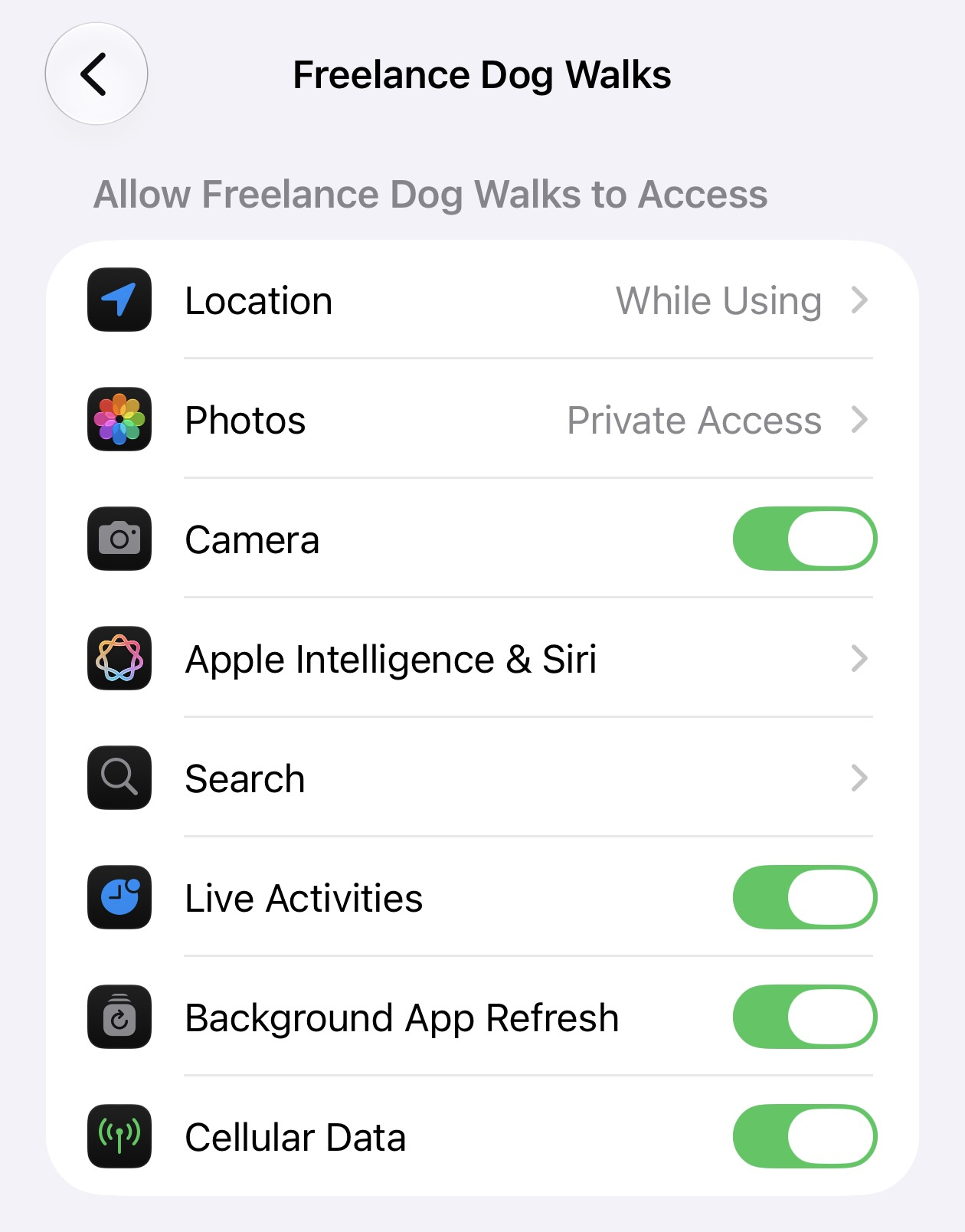
Please check these settings in iOS's Settings App, under Apps & then under Freelance Dog Walks.
The Help tab has How to Fix App Permissions, which checks Location, Camera and Calendar one at a time and points at whatever's off. Re-running onboarding — from the same tab, or Settings — does the same on its way through. The Help tab also has a guided setup for payment requests, and links back to these pages.
Walks
Does tracking keep working with the screen off?
Yes. Start a walk and the app maps your route and counts distance and time until you finish, screen on or off. The walk also shows live on your Lock Screen and in the Dynamic Island, and you can finish it right from there without unlocking.
What happens if my phone dies or the app is closed mid-walk?
Nothing is lost. The next time the app opens, the interrupted walk is saved and closed off, so it doesn't sit in your list reading "in progress" forever.
Why is my route missing or jagged?
Usually a location setting. In iOS's Settings app, under Apps → Freelance Dog Walks → Location, choose While Using the App and make sure Precise Location is on — without it, iOS only shares an approximate position and the map can't draw a real route. You can also re-run onboarding from the app — the Help tab, or Settings — which walks through the permissions step by step.
Apple Watch
Do I need my iPhone with me?
Yes. The watch app is a companion to the one on your phone — your iPhone does the GPS and keeps every walk, dog and owner. If you wander out of range mid-walk the watch says so, and the walk carries on recording on the phone; the watch catches up when you're back together.
What can I do from my wrist?
Start a walk with one dog or a whole pack, watch the time and distance as you go, flag bathroom breaks dog by dog, and finish the walk. Everything you do there lands on your phone as though you'd tapped it yourself.
How do I get the watch app?
It comes with the iPhone app — there's nothing separate to buy or download. If it doesn't appear on its own, open the Watch app on your iPhone, scroll to Available Apps, and tap install next to Freelance Dog Walks.
Nothing shows up on the watch — where are my dogs?
Open the app on your iPhone once and leave it on screen for a moment. The watch holds nothing of its own, so it needs the phone app to have been running to send it your roster.
On your Mac
What's the Mac app for?
The desk work. Go back through your walks on a bigger screen, correct a cost, build and send invoices, and see what's owed at a glance. Tracking a walk, taking photos and texting a recap stay on the phone, which is where you are when you're actually out with the dogs.
Do I have to copy anything across?
No. It's the same private iCloud behind both, so the walks you finished today are already on the Mac when you sit down.
Does it run on iPad?
Yes. An iPad with room becomes the same desk the Mac is — dashboard, walks table, invoice studio, and the schedule at month scale — and squeezed into Split View it's the iPhone app it already was. It's part of the same app, so there's nothing separate to buy.
The schedule
How do I see my walking week in the app?
Connect a calendar for each owner: open the owner, tap Edit, then Connect Calendar, and pick one of your own calendars — iCloud or Google both work, one calendar per owner. Every booking on it lines up in the app: swipe through the days on your iPhone's Walks tab, and see whole months on your Mac or iPad.
Can I change a booking from the app?
Yes — tap any booking to edit it, and the change saves into the calendar itself, so it syncs back everywhere the calendar lives. And when the next walk starts within half an hour, it wears a Start Now button that begins the walk on the spot.
Why does the app ask for calendar access?
The schedule reads and edits through the calendars on your device, and that needs calendar access. It's optional — unlike location for the maps or the camera for photos, the app works fine without it — and it only asks when you connect a calendar or say yes during setup.
Can an owner see their dog's schedule?
Share the calendar with them read-only, straight from Google or iCloud, and they always see their own walks — just never anyone else's, because every owner has a calendar of their own.
Can I see my own appointments beside the walks?
Yes. Open Settings — on your iPhone, Mac, or iPad — and check your personal or work calendars under Schedule: they appear across the week in quiet gray, read-only, on every device. An eye button on the schedule tucks them away when you want only the dogs.
Sharing & payment
Do I invoice, or just request payment?
Whichever suits how you run things. Requesting payment is the casual route — a message through an app or site like Venmo, asking for what a walk cost. Invoicing is for formal bookkeeping: a numbered invoice with dates, walks, and a total, sent in the body of an email or as a PDF — and it can still carry your Venmo link alongside. You control this in Settings: Enable Invoicing switches invoicing on or off across the app (off hides it, nothing is deleted), Enable PDFs chooses between a PDF attachment and a formatted email, and Request Payment Apps is where your payment links live either way.
Can owners see my notes about their dog?
No. Breed, birthday, and your notes — temperament, allergies, where the spare leash lives — are just for you. Recaps share only the walk: map, stats, photos, and the note you write for that walk.
How do the payment links work?
In Settings → Request Payment Apps, switch on the apps you use and add your usernames. Set what a walk cost as you finish it, and recaps include a one-tap link asking for exactly that amount. Only the apps you've switched on appear anywhere in the app — if you only take Venmo, the others stay out of your way.
How do I request payment for several walks at once?
On an owner's page, tap a payment app under Request Payment, select the walks, and the app opens ready to ask for the exact total. Each walk then shows where its money stands — unrequested, requested, or paid.
Invoicing
How does invoicing work?
On an owner's page, tap New Invoice, select the completed walks to bill, and the app issues a numbered invoice — dates, walks, and total — due in 30 days. Send it by email as a PDF attachment or as a formatted email (your choice in Settings), with your payment link and a scannable QR code included. The owner's page lists every invoice with its status: paid, due, or overdue.
What happens when an invoice is paid?
Mark it paid — on the walk's page, or from the invoice's menu — and every copy you send from then on becomes a receipt: a PAID stamp, no due date, and no more asking for money.
What if an owner pays me outside an invoice?
Mark the walk itself as paid by tapping its payment status, or create the invoice and mark it paid right away so your records match. And if you never invoice at all, switch Enable Invoicing off in Settings — invoicing disappears from the app, and Request Payment still works.
Can I text an invoice?
With Enable PDFs on, yes — the invoice travels as an attachment, which a text can carry. With PDFs off, invoices go as formatted email only, because a text message can't carry the table of walks.
Why do recap emails come from my personal address?
Recaps are sent from the walker email you set in the app's Settings — as long as that address is also set up as an account in iOS Mail. If it isn't, Mail quietly falls back to its default account, so add the address under Settings → Mail → Accounts first.
Owners & dogs
One person owns three of my dogs — do I type their number three times?
Not anymore. Owners have their own pages: contact details live with the person, their dogs live under them, and changing a phone number once changes it everywhere.
Two people share the dog — can I add them both?
Yes. On the owner's page, tap Edit, then Add Co-Owner — a household can hold as many people as it needs. Walk recaps and invoices reach everyone with an email on file, texts reach every phone, and the household's names appear together across the app.
Where do I put an owner's address?
On the owner's form. Start typing the street and the app suggests the full address — one tap fills street, city, state, and ZIP. It prints on your invoices, and tapping it on the owner's page opens Apple Maps.
What does archiving an owner do?
It tucks away the owner along with their dogs and those dogs' walks — one client, one action. Restoring the owner brings back exactly what that archive took, and leaves anything you'd archived separately where it was.
Can I get an archived walk or dog back?
Yes — Settings → View Archive, then tap restore on anything there. Walks archive themselves 90 days after they happen; dogs and owners only when you archive them. Anything archived is kept for a year and then permanently deleted, and until then it can be restored to where it was.
Making it yours
Can I change how the app looks?
Yes — there are four themes: Dusk, a muted indigo that's kinder on the eyes first thing and last thing, and the one the app wears until you choose; Warm, the original look; Slate, a clean white and near-black that's the easiest to read in bad light; and Meadow, a soft green. Pick one at the end of setup or any time under Settings → Theme, and your Home Screen widgets — and your other devices — follow along.
Is light or dark part of the theme?
No, they're separate on purpose, so every theme works either way. Settings → Appearance can follow your phone's own light and dark setting — including any schedule you've set there — or hold the app one way whatever the phone does. Widgets follow your device's setting rather than the app's, because nothing can override how a widget is drawn.
Can I put my business name on it?
Add it under Settings → Walker and it takes over the app's header, leads the signature on every recap you send, and heads your invoices. Your business website and logo can join it there: the website becomes a tappable link on everything you send, and the logo takes the place of the app's own — in the header, and beside your signature on emails, invoices and the invoice PDF. Leave any of them empty and the app simply keeps its own name and paw. Changing them later also re-brands invoices you send again from older records — the amounts and dates on them never change.
Do my details carry across my devices?
Yes. Your name, business name, website and logo, payment usernames and invoicing settings travel with your iCloud account, so what you set on your iPhone is already there on your iPad and Mac. Your theme and light-or-dark choice travel the same way — pick Dusk on your phone and every device wears it.
Trial & purchase
What does the app cost?
You get the full app free for seven days. After that, a single one-time purchase unlocks it forever — no subscription, no monthly bill, nothing to cancel.
Do I get another seven days on my Mac?
No — the trial is one seven-day stretch across everything you own, not a fresh week per device. Installing on the Mac after a few days on your phone picks the trial up where it stands.
Do I have to buy it again for my Mac or my Apple Watch?
No. One purchase covers all three. It belongs to your Apple ID, so buying it anywhere unlocks it everywhere — and the watch app comes along with the iPhone app, with nothing separate to buy. If a device hasn't caught up, open Settings → Restore Purchases.
I got a new iPhone — do I have to buy it again?
No. Your purchase belongs to your Apple ID. On the new phone, open Settings → Restore Purchases and it unlocks without paying again.
Your data
Where is my data stored?
On your device and in your own private iCloud, which also syncs it across your devices. Nothing is sent anywhere else unless you choose to share a recap. The Privacy Policy has the full picture.
Why are photos stored at a maximum resolution of 1600 × 1600 pixels?
Because it uses significantly less of your iCloud storage. Walk photos live in your own private iCloud, so every megabyte they take is yours. Capped at 1600 pixels on the long side, a photo still looks sharp everywhere the app or a recap email shows it — at a fraction of the size a straight-off-the-camera frame would take.
How do I delete everything?
Settings → Delete All Data permanently removes your profile and every dog, walk, and photo from your device and your iCloud. It can't be undone, so the app asks first.
Why is the camera black when I try to take a photo?
The app doesn't have camera permission. In iOS's Settings app, under Apps → Freelance Dog Walks, switch Camera on — or re-run onboarding from the app — the Help tab, or Settings — and it will ask again.